
Upgrading from BI Publisher to Analytics Publisher on the applications tier is a requirement for moving to the Next Generation Technology Stack. You should complete this process as soon as possible along with the other prerequisites. The primary souce for this inforation is KA1181.
Prerequisites
EBS 12.2.7
AD/TXK Delta 17
ATG Patch 12.2.13 (this is the version released with EBS 12.2.14)
If you have to patch ATG, I suggest going to 12.2.14 so that you get the new Redwood look and feel.
Applications Patches
OAP: Add Support for Analytics Publisher: 3760849
XDOTRANS: JC4P Template Translator Generate MLS_TEMPLATE That Didn’t Exist: 37311063
Oracle Analytics Publisher 7.6.1 Re-hosting Palltch for EBS 12.2 (v4): 38236376
EBS Consolidated Patch for Analytics Publisher: 35620323
If using Public Sector Payroll, you will also need 34986658
I also found a patch if you have issues with templates in blobs: 38290992 (KB590156)
After completing the patch cycle for these patches, both BI Publisher and Analytics Publisher are available.
Configuration
In order to user Analytics Publisher, the next step is to change the configuration variable, s_xdo_runtime_release
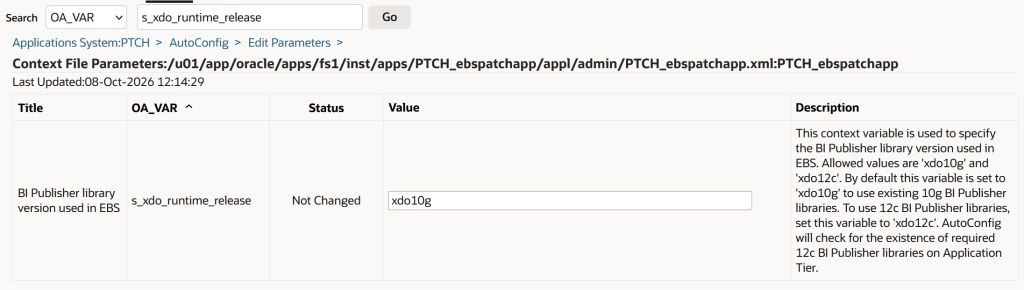
- Change the value to xdo12c, and click save.
- Shutdown the apps processes with adstpall.sh
- Run Autoconfig
- Startup the apps processes with adstrtal.sh
Re-Generate Layout Templates
This needs to be done now and every time Analytics Publisher is updated.
- Login and Choose the XML Publisher Administrator responsibility
- Run XML Publisher Template Re-Generator and change the parameter to ALL
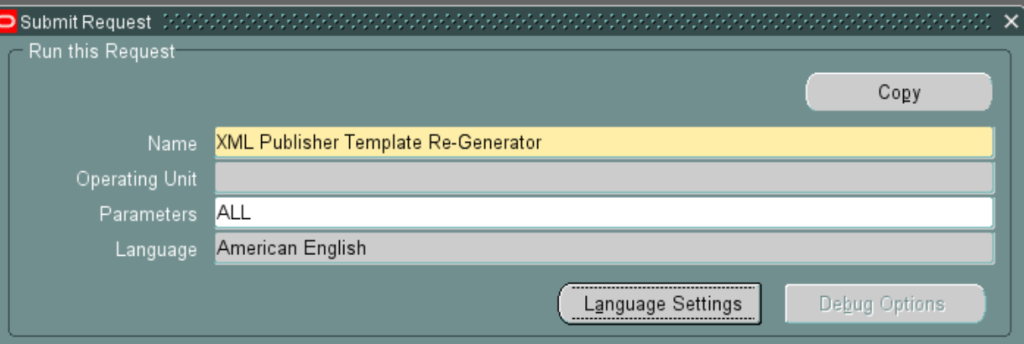
- After it completes successfully, run XML Publisher Template Translation
- Leave all the parameters blank
- Ensure it completes successfully
On the system side, the Analytics Publisher is now operational. Report developers will need to use Oracle Analytics Publisher Desktop to develop reports (see notes KA1181 and KB829153). Also be aware of Excel changes and PDF font changes that may impact your reports.